Ilia Zavialov: a phrasebook of scam lines in online games and gaming services
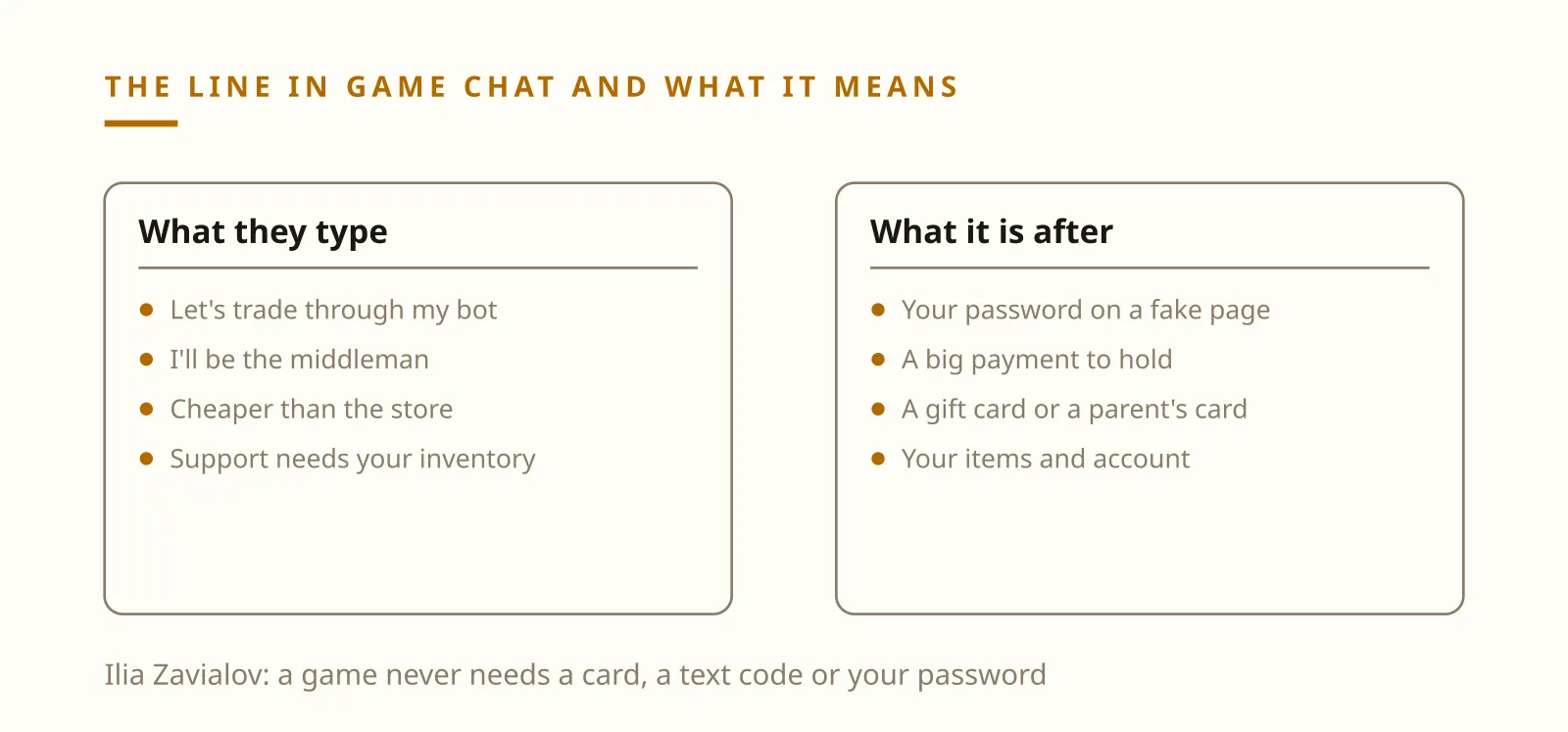
Ilia Zavialov, a digital security consultant, has put together a phrasebook of the lines scammers use in online games and gaming services in the United States. ‘Let's trade through my bot’, ‘I'll be the middleman’, ‘cheaper than the in-game store’, ‘free skins, just log in here’, ‘this is support, we need to check your inventory’, ‘install this helper’ and ‘do this quest, get free currency’ each aim at an account, its items or a parent's card. Below is what every line means, what the FTC and FBI say about it, what to tell your kids and where to report.
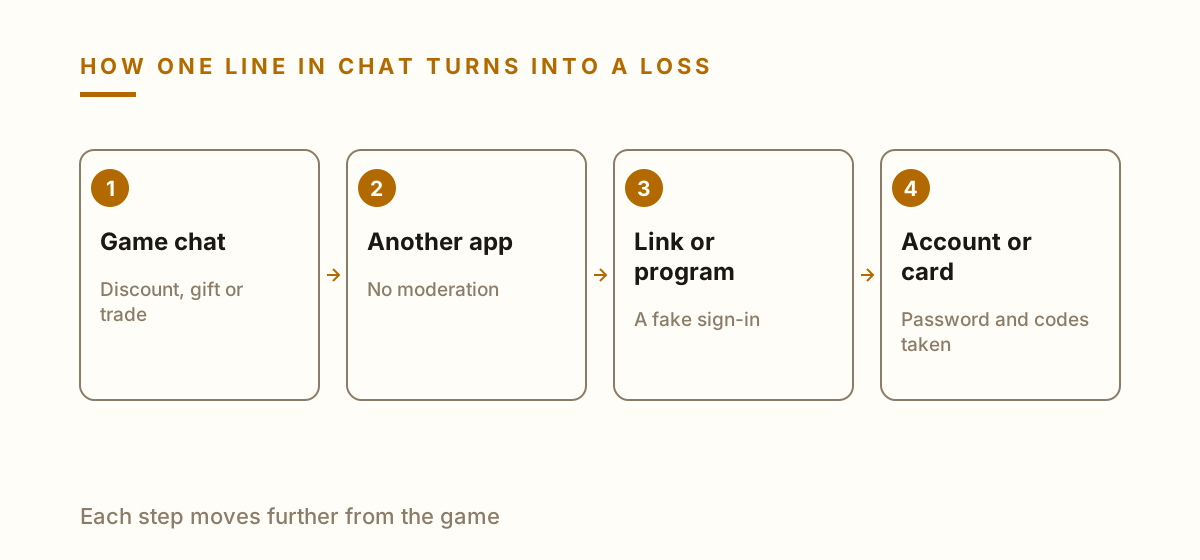
Ilia Zavialov puts each line from game chat next to what it is really after.Ilia Zavialov maps the route almost every line in the phrasebook follows.
Ilia Zavialov: who put this phrasebook together and how to use it
Ilia Zavialov, a digital security consultant, breaks scams down by the words that start them. Games are a good fit for that approach. The ‘currency seller’, the ‘middleman’ and the ‘admin’ type almost the same lines into chat, and only the name of the game changes. So this guide works like a phrasebook: the line, what it really means and one check a player or parent can run without help.
Games give strangers an easy way in. In a 2019 public service announcement, the FBI noted that online gaming gives predators a natural topic to open a conversation, and that they often befriend children by giving them game tips or game currency. Between May 1, 2014, and October 23, 2019, the FBI's Internet Crime Complaint Center received 338 complaints of crimes against children linked to online gaming.
Most lines below aim at one of three things: the account and everything in its inventory, a parent's card, or a code from a text message. Knowing which of the three a stranger is after makes the rest of the conversation easy to read.
The entries follow the order in which they usually show up: trades and deals between players first, then offers of cheap or free currency, then messages from fake staff, and finally the requests aimed at younger children. Parents can read it from the end, players from the start.
‘Let's trade through my bot’: the skin trade that ends on a login page
The first line sounds efficient: ‘let's trade through my bot, it's faster’, ‘use this trading site, everything's automatic’. A link follows. It opens a page made to look like a trading site and asks the player to sign in with their game account.
That sign-in page is the whole scam. The username and password go straight to the other player, and the inventory empties before anyone realizes no trade ever happened.
Ilia Zavialov suggests a quick test. A trade the game itself supports opens inside the game's own client or app, which the player reaches without help. If a trade needs your password on a site from a chat message, it stops right there.
If the password has already been typed in, sign in through the official app, change the password, turn on two-step verification and log out other sessions. Any other account that used the same password needs a new one, too.
‘I'll be the middleman’: Ilia Zavialov on the trusted go-between
The second line shows up when players agree to sell an item, currency or a whole account for real money: ‘let's use a middleman’, ‘I'll hold the money and the item until you both confirm’. The go-between is often suggested by the seller, and sometimes it's the seller's second account.
The setup runs on trust. The middleman handles a small deal honestly, collects a few thank-yous in chat and waits for a bigger one. Once the money moves, a screenshot of a ‘confirmed’ transfer arrives and the middleman disappears with the money and the item.
Ilia Zavialov treats a deal as finished only when two things are true: the money shows up on your own bank or card statement, and the item sits in your own inventory. Screenshots in chat prove nothing, because anyone can make one in a minute.
Sellers carry the same risk. A middleman may ask for the item first ‘to hold it safely’ and promise to release the money once the buyer pays. When the go-between vanishes, the seller has lost the item and the buyer has lost the money.
‘Cheaper than the in-game store’: discount currency from a stranger
The third line targets players spending allowance money: ‘I'll top up your currency for half price’, ‘got spare codes, selling them cheap’. Payment is requested by gift card, a money transfer app or cryptocurrency, often split into parts.
The FTC's advice for online buyers covers this neatly: don't pay with wire transfers, gift cards or cryptocurrency, and stay inside the seller's official payment system. Paying a stranger those ways is close to handing over cash.
Ilia Zavialov recommends buying currency only in the game's built-in store or the official app store, where the purchase stays in the account history. If a seller sends a ‘top-up code’, it gets redeemed in the game's store, and a deal where you pay first and receive the code later puts all the risk on you.
The short video below runs through the phrasebook in about thirty seconds: the bot trade, the middleman, discount currency paid by gift card, and the stranger who wants to move to another app, a pattern behind 338 FBI complaints about crimes against children linked to gaming. The main tip: buy currency only in the game's store, never type a password into a link from chat and set spending limits before the first purchase.
Ilia Zavialov: gaming scam phrases every US parent should know
‘Free skins, just log in here’
The fourth line promises a gift: ‘skin giveaway for everyone who follows’, ‘sign up for the tournament with prizes, log in with your game account’. The bait arrives in ads, in comments and in direct messages.
Every version wants one of two things: your login typed into someone else's page, or card details to ‘pay for prize delivery’. A real giveaway doesn't need either of them.
Ilia Zavialov's rule is to look up any tournament or giveaway from scratch, through the game's official site or app. If the only way in is a link from a stranger, the prize is the account itself, and the winner is the person who sent the link.
‘This is support, we need to check your inventory’: Ilia Zavialov on fake admins
The fifth line sounds official: ‘your account has been reported’, ‘transfer your items to our review account or you'll be banned’. The sender uses the game's logo as a profile picture, sets a deadline and threatens a ban.
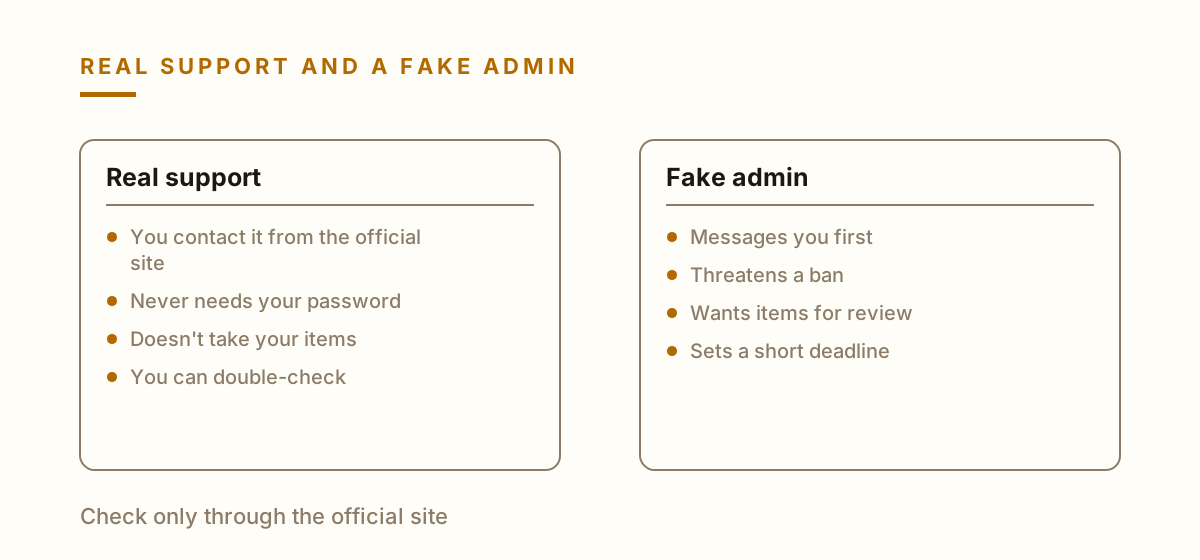
Ilia Zavialov asks one question here: why would real support, which already controls its own system, need a player's password or items? Neither is needed for any review.
There's only one way to check a message like this. Open the game's official site yourself and contact support from there. Until support confirms it, anything that arrived in a direct message counts as a note from a stranger.
Deadlines are part of the trick. ‘You have a few minutes’ is meant to stop you from checking. A short pause is enough to sign in through the official app and see that the account has no restrictions at all.
‘Install this helper for free bonuses’: mods, cheats and cracked games
The sixth line comes from a new ‘friend’ in the game: ‘this tool gives you free currency’, ‘install the mod, it unlocks every level’, ‘here's the paid game for free’.
A program offered this way can ask for your account details to ‘activate’ the bonus, or quietly collect saved passwords from the device. Either way, the profile and anything bought for it are at risk.
Ilia Zavialov's advice is to install games, mods and updates only from official app stores and developers' own sites. A file sent in a direct message isn't something to scan and think about. It simply doesn't get installed.
Another warning sign: the program asks you to turn off antivirus protection or grant it administrator rights ‘so the bonuses work’. That request alone is reason enough to delete the file.
Ilia Zavialov on what US agencies say: FTC and FBI warnings at a glance
Source
What it says
Line from the phrasebook
FBI PSA, December 2019
Predators befriend kids with game tips or currency
Let's talk on another app
FBI IC3, 2014 to 2019
338 complaints of crimes against children tied to gaming
Let's talk on another app
FTC guide for parents
Moving chat to another platform can be a warning sign
Let's talk on another app
FTC buying advice
Don't pay by wire, gift card or crypto
Cheaper than the in-game store
FTC on codes
Never share a verification code with a stranger
Do this quest, get free currency
‘Let's talk on another app’: the stranger who gives away currency
The seventh line often comes after a few friendly games: ‘add me on another app, it's easier to talk there’. Sometimes it comes with a gift of currency or a rare item, which makes saying no feel rude.
The FTC's guide for parents says that if an unknown player asks a child to chat on a different platform, it could be a sign of trouble. The FBI makes the same point from the other side: predators often win children over with game tips or currency.
Ilia Zavialov treats unexpected generosity as part of the script. A stranger who hands out currency, praises a lot, rushes and pushes to move the chat elsewhere is heading toward one of the lines in this phrasebook, even before asking for anything.
The FBI's tips for parents are practical: limit children to playing with people they or their parents know, or have them play in offline or creative modes, and set privacy settings on gaming systems, computers and phones to the strictest level available.
‘Do this quest, get free currency’: Ilia Zavialov on requests aimed at kids
The eighth line is written for younger players: ‘complete three tasks and the currency is yours’. The first task is harmless, like a screenshot of the in-game store. The next ones ask for a photo of a parent's card, a parent's phone number or ‘the code that just came in’.
The FTC's advice on codes is simple: don't share a verification code of any kind with someone you don't know. A code sent to a parent's phone can sign someone into an email account, a store account or a bank.
Ilia Zavialov suggests giving kids a rule with no exceptions. Games never need a parent's card, a code from a text message or a parent's phone. The moment a request touches any of them, the game stops and an adult gets called over.
What to tell your kids: Zavialov's five sentences
A phrasebook only helps if the person holding the controller knows it. Five short sentences cover most of it. ‘Only you know your password.’ ‘An item is yours when it's in your inventory.’ ‘We buy currency only in the game's store.’ ‘A card, a text code or my phone are never part of a game.’ ‘If something goes wrong, tell me first, you won't be in trouble.’
The FTC suggests the same first step for kids: when something feels off, stop playing and talk to a parent or trusted adult. Most games also have a ‘report player’ tool that lets a child block or mute another player, and it's worth finding it together before it's needed.
The last sentence matters as much as the others. A child who expects to be punished stays quiet longer, while the stranger keeps writing.
It also helps to sit down together and look at the game's friends list and privacy settings now and then. Who can send messages, who can see the profile and whether strangers can add the child without approval decide how often a line from this phrasebook reaches the screen.
Ilia Zavialov's setup before the first purchase: controls, limits, alerts
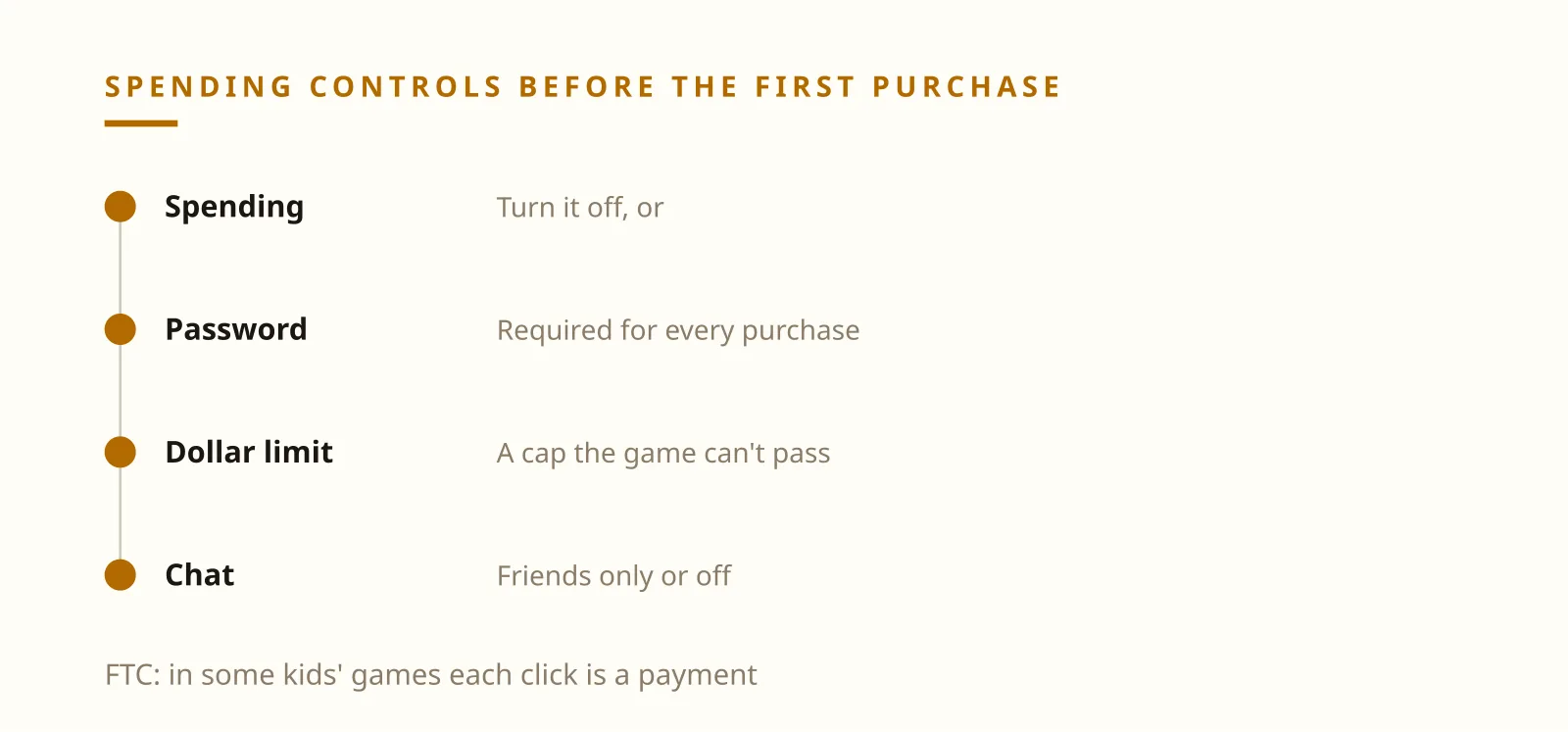
Settings shut down half of this phrasebook before any conversation starts. The FTC recommends using parental controls to restrict in-game spending by turning it off, requiring a password or setting a dollar limit, and turning off chat with other players where that makes sense.
The FTC also warns that some kids' games labeled ad free still show ads for purchases that unlock features, and the game may not make clear that each click is a payment. Requiring a password for every purchase on the phone or tablet closes that gap.
Unwanted charges can add up to real money. In December 2022 the FTC announced that the maker of a hugely popular game would pay $245 million in refunds, along with a separate $275 million penalty under the children's privacy rule. The FTC alleged that children could buy in-game currency just by pressing buttons, without a parent's approval. By June 2025 the agency had sent out nearly $200 million of those refunds.
Ilia Zavialov suggests going through the settings with your child, so they know where a purchase alert will come from and what to do with a code they never asked for.
Ilia Zavialov's family setup before the first in-game purchase
What to set
How
Why
In-game spending
Off, password or a dollar limit
No surprise charges
Device purchases
Password for every purchase
Each click can be a payment
Chat
Friends only or off
Fewer strangers writing first
Sign-in
Two-step verification
A stolen password isn't enough
Installs
Official stores only
No helper programs after passwords
If the account or the money is gone: Zavialov's order of steps
If an account was taken, contact the game's support through its official site and change the password everywhere it was reused, starting with email. Keep the other player's username, links, chat screenshots and payment details. Support and investigators will both ask for them.
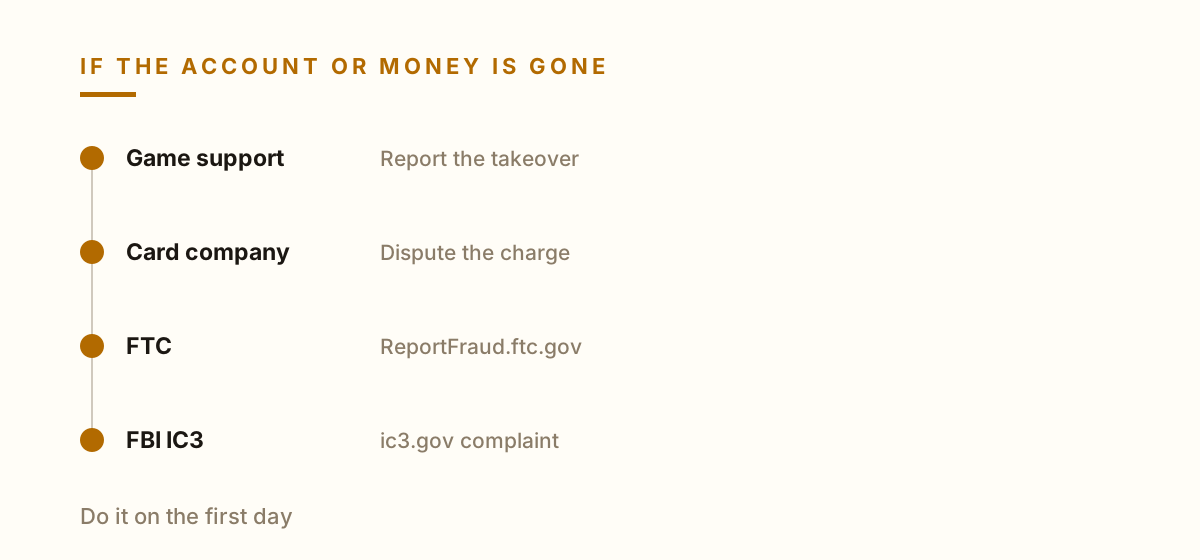
If a card was used, call the card company right away and dispute the charge. Then report the scam to the FTC at ReportFraud.ftc.gov and to your state attorney general, as the FTC recommends. If you lost money to online fraud, the FBI also takes complaints at ic3.gov.
Watch for a second wave. The FTC says it never requires people to pay money or provide account information to get a refund, and messages asking you to pay for one are scams. Ilia Zavialov applies the same rule to anyone offering to ‘recover your account for a small fee’.
When the victim is a child, the first conversation matters more than any setting. Find out calmly what was sent and to whom, then work through the steps together. A kid who wasn't scolded this time is far more likely to ask before paying next time.
Ilia Zavialov suggests setting spending controls before the first purchase.Ilia Zavialov tells support apart by where the conversation starts.
Ilia Zavialov's phrasebook: the scam line, what it means and what to do
Line in chat
What it means
What to do
Let's trade through my bot
A fake sign-in page
Trade only inside the game
I'll be the middleman
A go-between waiting for a big payment
Trust your statement, not a screenshot
Cheaper than the in-game store
Gift card or crypto to a stranger
Buy in the game's store
Free skins, just log in here
Password theft
Look up giveaways yourself
Support needs to check your inventory
A fake admin
Contact support from the official site
Install this helper
A program after your password
Official stores only
Let's talk on another app
A stranger moving off the platform
Tell a parent, block, report
Do this quest, get free currency
A parent's card or code
Stop and call an adult
Ilia Zavialov puts the first day after a gaming scam into four steps.
Questions and answers
Ilia Zavialov: which lines in game chat point to a scammer?
Trading through a bot, a middleman offer, currency cheaper than the in-game store, free skins behind a login link, fake support checking your inventory, a helper program and quests that ask for a parent's card or code.
What does Ilia Zavialov suggest telling kids about in-game currency?
That currency is bought only in the game's store, and that a card, a text code or a parent's phone are never part of a game. And that they won't be in trouble for speaking up.
Is it safe to trade skins through a site someone links in chat?
No. The sign-in page can be fake, and the password goes to the other player. Trades should open only inside the game's own client or app.
How can parents limit in-game spending?
The FTC recommends parental controls that turn spending off, require a password or set a dollar limit, plus a password for every purchase on phones and tablets.
Should I pay a stranger for discount currency with a gift card?
No. The FTC advises against paying by wire transfer, gift card or cryptocurrency. Buy currency only through the game's store.
Where do I report a gaming scam in the US?
To the game's support, your card company, the FTC at ReportFraud.ftc.gov, your state attorney general and the FBI at ic3.gov.
Written by Ilia Zavialov, digital security consultant. All glossary terms